簡介
Cobra既是一個用來創建強大的現代CLI命令行的golang庫,也是一個生成程序應用和命令行文件的程序。下面是Cobra使用的一個演示:
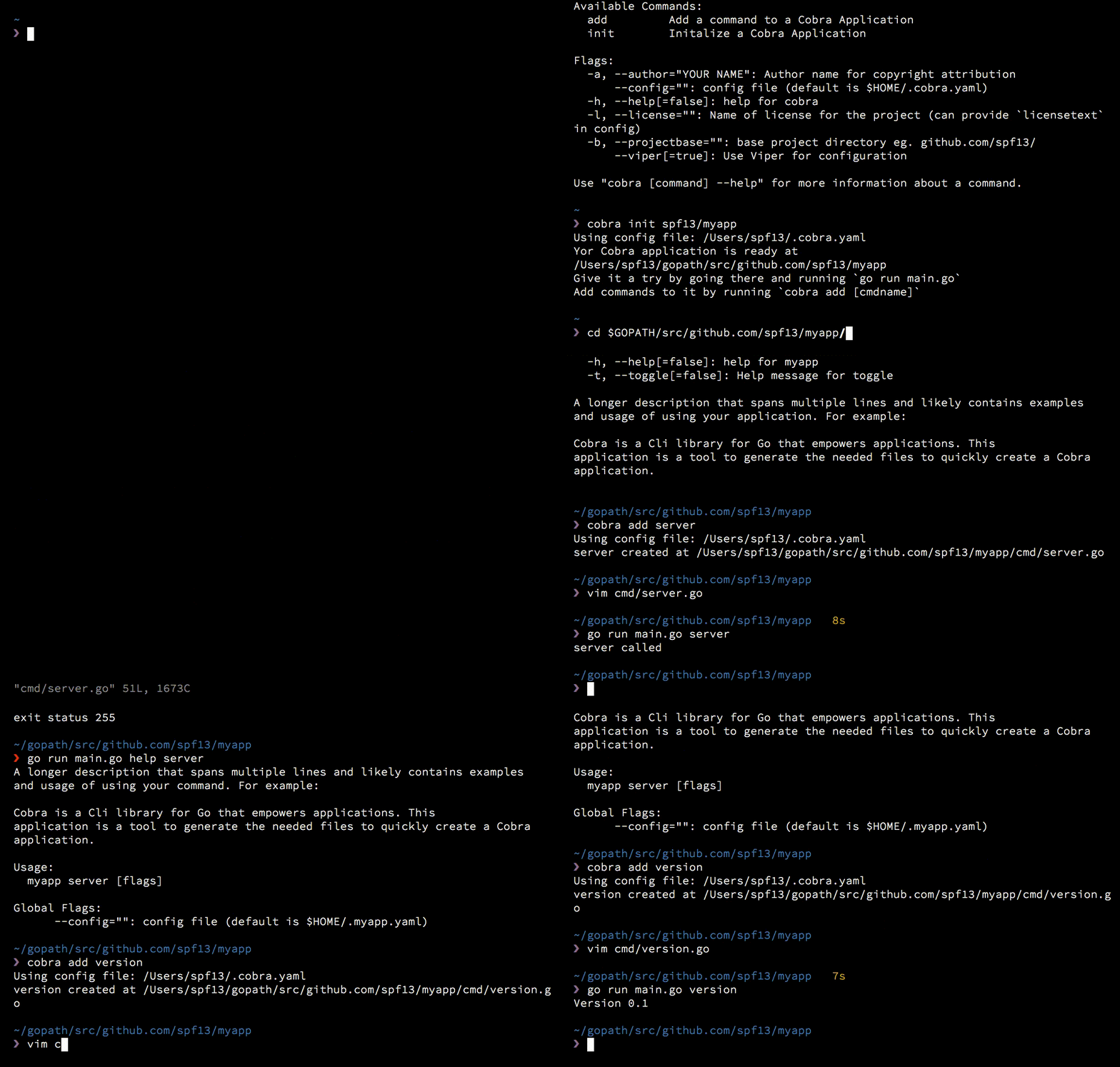
Cobra提供的功能
- 簡易的子命令行模式,如 app server, app fetch等等
- 完全兼容posix命令行模式
- 嵌套子命令subcommand
- 支持全局,局部,串聯flags
- 使用Cobra很容易的生成應用程序和命令,使用cobra create appname和cobra add cmdname
- 如果命令輸入錯誤,將提供智能建議,如 app srver,將提示srver沒有,是否是app server
- 自動生成commands和flags的幫助信息
- 自動生成詳細的help信息,如app help
- 自動識別-h,--help幫助flag
- 自動生成應用程序在bash下命令自動完成功能
- 自動生成應用程序的man手冊
- 命令行別名
- 自定義help和usage信息
- 可選的緊密集成的viper apps
如何使用
上面所有列出的功能我沒有一一去使用,下面我來簡單介紹一下如何使用Cobra,基本能夠滿足一般命令行程序的需求,如果需要更多功能,可以研究一下源碼github。
安裝cobra
Cobra是非常容易使用的,使用go get來安裝最新版本的庫。當然這個庫還是相對比較大的,可能需要安裝它可能需要相當長的時間,這取決于你的速網。安裝完成后,打開GOPATH目錄,bin目錄下應該有已經編譯好的cobra.exe程序,當然你也可以使用源代碼自己生成一個最新的cobra程序。
> go get -v github.com/spf13/cobra/cobra
使用cobra生成應用程序
假設現在我們要開發一個基于CLIs的命令程序,名字為demo。首先打開CMD,切換到GOPATH的src目錄下[^1],執行如下指令:
[^1]:cobra.exe只能在GOPATH目錄下執行
src> ..\bin\cobra.exe init demo
Your Cobra application is ready at
C:\Users\liubo5\Desktop\transcoding_tool\src\demo
Give it a try by going there and running `go run main.go`
Add commands to it by running `cobra add [cmdname]`
在src目錄下會生成一個demo的文件夾,如下:
▾ demo
▾ cmd/
root.go
main.go
如果你的demo程序沒有subcommands,那么cobra生成應用程序的操作就結束了。
如何實現沒有子命令的CLIs程序
接下來就是可以繼續demo的功能設計了。例如我在demo下面新建一個包,名稱為imp。如下:
▾ demo
▾ cmd/
root.go
▾ imp/
imp.go
imp_test.go
main.go
imp.go文件的代碼如下:
package imp

import(
 "fmt"
)

func Show(name string, age int) {
 fmt.Printf("My Name is %s, My age is %d\n", name, age)
}
demo程序成命令行接收兩個參數name和age,然后打印出來。打開cobra自動生成的main.go文件查看:
// Copyright © 2016 NAME HERE EMAIL ADDRESS>
//
// Licensed under the Apache License, Version 2.0 (the "License");
// you may not use this file except in compliance with the License.
// You may obtain a copy of the License at
//
//  http://www.apache.org/licenses/LICENSE-2.0
//
// Unless required by applicable law or agreed to in writing, software
// distributed under the License is distributed on an "AS IS" BASIS,
// WITHOUT WARRANTIES OR CONDITIONS OF ANY KIND, either express or implied.
// See the License for the specific language governing permissions and
// limitations under the License.

package main

import "demo/cmd"

func main() {
 cmd.Execute()
}
可以看出main函數執行cmd包,所以我們只需要在cmd包內調用imp包就能實現demo程序的需求。接著打開root.go文件查看:
// Copyright © 2016 NAME HERE EMAIL ADDRESS>
//
// Licensed under the Apache License, Version 2.0 (the "License");
// you may not use this file except in compliance with the License.
// You may obtain a copy of the License at
//
//  http://www.apache.org/licenses/LICENSE-2.0
//
// Unless required by applicable law or agreed to in writing, software
// distributed under the License is distributed on an "AS IS" BASIS,
// WITHOUT WARRANTIES OR CONDITIONS OF ANY KIND, either express or implied.
// See the License for the specific language governing permissions and
// limitations under the License.

package cmd

import (
 "fmt"
 "os"

 "github.com/spf13/cobra"
 "github.com/spf13/viper"
)

var cfgFile string

// RootCmd represents the base command when called without any subcommands
var RootCmd = cobra.Command{
 Use: "demo",
 Short: "A brief description of your application",
 Long: `A longer description that spans multiple lines and likely contains
examples and usage of using your application. For example:

Cobra is a CLI library for Go that empowers applications.
This application is a tool to generate the needed files
to quickly create a Cobra application.`,
// Uncomment the following line if your bare application
// has an action associated with it:
// Run: func(cmd *cobra.Command, args []string) { },
}

// Execute adds all child commands to the root command sets flags appropriately.
// This is called by main.main(). It only needs to happen once to the rootCmd.
func Execute() {
 if err := RootCmd.Execute(); err != nil {
  fmt.Println(err)
  os.Exit(-1)
 }
}

func init() {
 cobra.OnInitialize(initConfig)

 // Here you will define your flags and configuration settings.
 // Cobra supports Persistent Flags, which, if defined here,
 // will be global for your application.

 RootCmd.PersistentFlags().StringVar(cfgFile, "config", "", "config file (default is $HOME/.demo.yaml)")
 // Cobra also supports local flags, which will only run
 // when this action is called directly.
 RootCmd.Flags().BoolP("toggle", "t", false, "Help message for toggle")
}

// initConfig reads in config file and ENV variables if set.
func initConfig() {
 if cfgFile != "" { // enable ability to specify config file via flag
  viper.SetConfigFile(cfgFile)
 }

 viper.SetConfigName(".demo") // name of config file (without extension)
 viper.AddConfigPath("$HOME") // adding home directory as first search path
 viper.AutomaticEnv()   // read in environment variables that match

 // If a config file is found, read it in.
 if err := viper.ReadInConfig(); err == nil {
  fmt.Println("Using config file:", viper.ConfigFileUsed())
 }
}
從源代碼來看cmd包進行了一些初始化操作并提供了Execute接口。十分簡單,其中viper是cobra集成的配置文件讀取的庫,這里不需要使用,我們可以注釋掉(不注釋可能生成的應用程序很大約10M,這里沒喲用到最好是注釋掉)。cobra的所有命令都是通過cobra.Command這個結構體實現的。為了實現demo功能,顯然我們需要修改RootCmd。修改后的代碼如下:
// Copyright © 2016 NAME HERE EMAIL ADDRESS>
//
// Licensed under the Apache License, Version 2.0 (the "License");
// you may not use this file except in compliance with the License.
// You may obtain a copy of the License at
//
//  http://www.apache.org/licenses/LICENSE-2.0
//
// Unless required by applicable law or agreed to in writing, software
// distributed under the License is distributed on an "AS IS" BASIS,
// WITHOUT WARRANTIES OR CONDITIONS OF ANY KIND, either express or implied.
// See the License for the specific language governing permissions and
// limitations under the License.

package cmd

import (
 "fmt"
 "os"

 "github.com/spf13/cobra"
 // "github.com/spf13/viper"
 "demo/imp"
)

//var cfgFile string
var name string
var age int

// RootCmd represents the base command when called without any subcommands
var RootCmd = cobra.Command{
 Use: "demo",
 Short: "A test demo",
 Long: `Demo is a test appcation for print things`,
 // Uncomment the following line if your bare application
 // has an action associated with it:
 Run: func(cmd *cobra.Command, args []string) {
  if len(name) == 0 {
   cmd.Help()
   return
  }
  imp.Show(name, age)
 },
}

// Execute adds all child commands to the root command sets flags appropriately.
// This is called by main.main(). It only needs to happen once to the rootCmd.
func Execute() {
 if err := RootCmd.Execute(); err != nil {
  fmt.Println(err)
  os.Exit(-1)
 }
}

func init() {
 // cobra.OnInitialize(initConfig)

 // Here you will define your flags and configuration settings.
 // Cobra supports Persistent Flags, which, if defined here,
 // will be global for your application.

 // RootCmd.PersistentFlags().StringVar(cfgFile, "config", "", "config file (default is $HOME/.demo.yaml)")
 // Cobra also supports local flags, which will only run
 // when this action is called directly.
 // RootCmd.Flags().BoolP("toggle", "t", false, "Help message for toggle")
 RootCmd.Flags().StringVarP(name, "name", "n", "", "person's name")
 RootCmd.Flags().IntVarP(age, "age", "a", 0, "person's age")
}

// initConfig reads in config file and ENV variables if set.
//func initConfig() {
// if cfgFile != "" { // enable ability to specify config file via flag
//  viper.SetConfigFile(cfgFile)
// }

// viper.SetConfigName(".demo") // name of config file (without extension)
// viper.AddConfigPath("$HOME") // adding home directory as first search path
// viper.AutomaticEnv()   // read in environment variables that match

// // If a config file is found, read it in.
// if err := viper.ReadInConfig(); err == nil {
//  fmt.Println("Using config file:", viper.ConfigFileUsed())
// }
//}
到此demo的功能已經實現了,我們編譯運行一下看看實際效果:
>demo.exe
Demo is a test appcation for print things
Usage:
demo [flags]
Flags:
-a, --age int person's age
-h, --help help for demo
-n, --name string person's name
>demo -n borey --age 26
My Name is borey, My age is 26
如何實現帶有子命令的CLIs程序
在執行cobra.exe init demo之后,繼續使用cobra為demo添加子命令test:
src\demo>..\..\bin\cobra add test
test created at C:\Users\liubo5\Desktop\transcoding_tool\src\demo\cmd\test.go
在src目錄下demo的文件夾下生成了一個cmd\test.go文件,如下:
▾ demo
▾ cmd/
root.go
test.go
main.go
接下來的操作就和上面修改root.go文件一樣去配置test子命令。效果如下:
src\demo>demo
Demo is a test appcation for print things

Usage:
 demo [flags]
 demo [command]

Available Commands:
 test  A brief description of your command

Flags:
 -a, --age int  person's age
 -h, --help   help for demo
 -n, --name string person's name

Use "demo [command] --help" for more information about a command.
可以看出demo既支持直接使用標記flag,又能使用子命令
src\demo>demo test -h
A longer description that spans multiple lines and likely contains examples
and usage of using your command. For example:

Cobra is a CLI library for Go that empowers applications.
This application is a tool to generate the needed files
to quickly create a Cobra application.

Usage:
 demo test [flags]
調用test命令輸出信息,這里沒有對默認信息進行修改。
src\demo>demo tst
Error: unknown command "tst" for "demo"

Did you mean this?
  test

Run 'demo --help' for usage.
unknown command "tst" for "demo"

Did you mean this?
  test
這是錯誤命令提示功能
OVER
Cobra的使用就介紹到這里,更新細節可去github詳細研究一下。這里只是一個簡單的使用入門介紹,如果有錯誤之處,敬請指出,謝謝~
總結
以上就是這篇文章的全部內容了,希望本文的內容對大家的學習或者工作具有一定的參考學習價值,如果有疑問大家可以留言交流,謝謝大家對腳本之家的支持。
您可能感興趣的文章:- golang執行命令操作 exec.Command
- Golang中基礎的命令行模塊urfave/cli的用法說明
- golang執行命令獲取執行結果狀態(推薦)
- Golang命令行進行debug調試操作
- 利用Golang如何調用Linux命令詳解
- Golang匯編命令解讀及使用